
XCheck
See who isn’t following you back.
Find non-followers on X as you scroll your Following page. Review results, whitelist accounts and copy profile links in Chrome’s side panel.
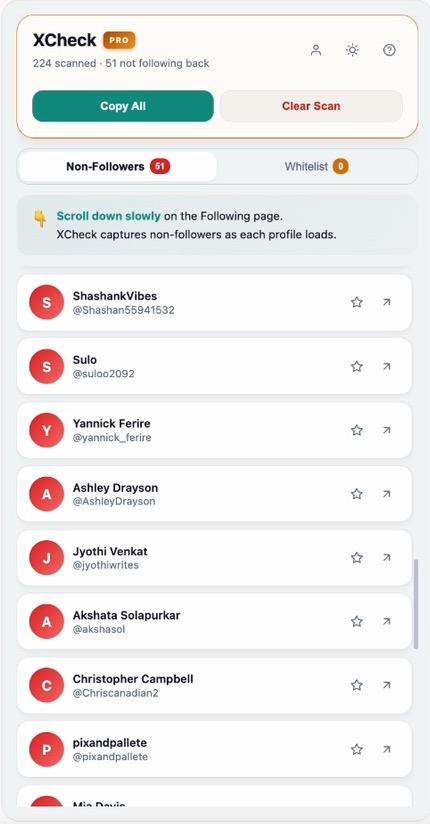
Scroll your Following page. See the results.
Open XCheck alongside X in desktop Chrome. As you scroll, accounts without the “Follows you” label appear in the side panel, with live counts of profiles scanned and non-followers found.
Review your list, your way.
Keep accounts you want to follow by adding them to your whitelist. They stay out of the non-follower results and the links copied from that list.
Use Copy All to copy profile URLs, or open a profile to take a closer look. XCheck leaves every follow and unfollow decision with you.
Start fresh when you need to.
Clear Scan resets the current results. Closing the side panel also clears them; reopen XCheck and scroll your Following page to scan again. Your scan results are processed in your browser. Optional Pro payments and license validation use Polar, as explained in the privacy policy.
FAQs
How do I find accounts that don’t follow me back?
Install XCheck in desktop Chrome, enter your X username and open your Following page. Scroll down slowly. XCheck scans profiles as they load and lists accounts without the Follows you label in the side panel.
Does XCheck unfollow accounts for me?
No. XCheck identifies accounts and links to their profiles. You decide which accounts to review and whether to unfollow them yourself on X.
What does the whitelist do?
Star an account to add it to your whitelist. Whitelisted accounts are excluded from the non-follower results and their Copy All output. You can review and copy your whitelist separately.
What happens when I close the side panel?
Closing the side panel clears the scan results. Reopen XCheck and scroll your Following page to scan profiles again. Clear Scan also clears the current results.
Where is my data processed?
Scan results are processed in your browser. Preferences and license information use Chrome local or sync storage as described in the privacy policy. Optional Pro payments and license validation use Polar; license validity is checked daily.
What’s free, and what does Pro include?
The free version scans up to 100 accounts per session. Pro removes that scan limit for a one-time payment of US$4.99, with license activation through Polar.
Which browser do I need?
XCheck is a Chrome extension for desktop Chrome. Open X in the browser and use the built-in side panel alongside your Following page.